// Workflow
How to Batch a Month of Ad Content in One Afternoon
A 3-step AI workflow: product photos, a brand-guideline prompt, and Higgsfield Supercomputer for generating a full batch of on-brand ad concepts without a shoot or an agency
To batch a month of ad content in one afternoon, do three things in order: prep 3-5 clean product photos, ask Claude to generate a written brand guideline from those photos, then feed that guideline plus the photos into Higgsfield's Supercomputer with a single ad-concept prompt. The brand guideline step: done first, before generating any ad - is what keeps the output on-brand instead of generic.
That's the whole workflow. Here's how to actually run it, plus the exact prompts.
What "batching ad content" actually means
Batching means generating your ad concepts for a full content cycle, a month's worth, a week's worth, whatever your posting cadence needs in one sitting, instead of starting from a blank page every time you need a new ad. It's the same principle behind a content calendar or a weekly shoot day: front-load the production, then distribute over time.
The bottleneck that usually kills batching for ads specifically is consistency. Five AI-generated ad concepts that all look like they came from different brands aren't a batch, they're five one-offs. That's the problem this workflow is built to solve.
The 3-step workflow
Step 1: Prep your product photos
You don't need a studio shoot for this. 3-5 clean photos, a few different angles, decent lighting, a plain background if you can manage it is enough raw material for the whole workflow. Phone photos are fine.
Step 2: Generate a brand guideline with any LLM model (GPT, Claude, Gemini,..) before generating any ad
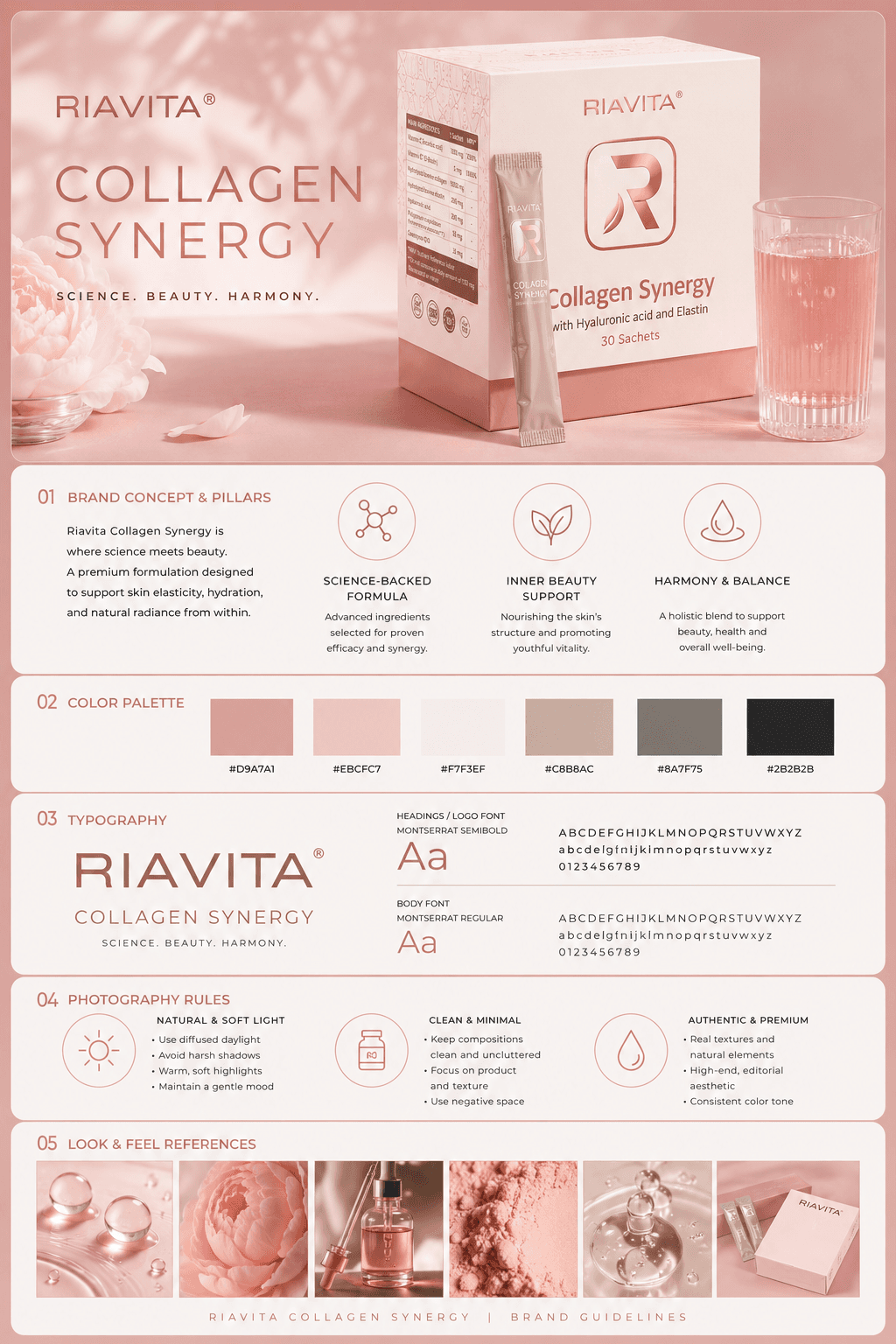
This is the step most people skip, and skipping it is exactly why AI-generated ads tend to look generic. Ask LLM to turn your product photos and a one-line brand description into a written brand guideline: color palette, typography direction, photography style, and a few words that describe your brand voice before you ask for a single ad concept.
That guideline becomes the brief every later prompt draws from, the same way a creative brief anchors an agency's work.
Prompt (paste into Claude, attach your product photos):
A professional, high-end brand identity guideline presentation template for a [BRAND TYPE/INDUSTRY] brand named "[BRAND NAME]". The product is [PRODUCT NAME]. Elegant, clean UI/UX multi-panel dashboard layout displaying visual asset rules on a clean background.

The top panel features a large full-body hero image of the product [PRODUCT NAME] on a relevant theme background.

The layout includes distinct, perfectly organized infographic sections divided by thin horizontal rules:
1. "01 BRAND CONCEPT & PILLARS" with clean text blocks and 3 minimal geometric circular line-art icons.
2. "02 COLOR PALETTE" showing a row of precise colors swatch squares with hex codes underneath.
3. "03 TYPOGRAPHY" displaying a bold, wide sans-serif logo and sample body text blocks.
4. "04 PHOTOGRAPHY RULES" with 3 circular diagram icons and bullet points of text rules.
5. "05 LOOK & FEEL REFERENCES" showing a horizontal grid row of 6 clean, consistent macro and micro photography references.

Graphic design, professional branding showcase, sharp typography, minimalist layout, extreme detail, high contrast, studio editorial presentation, 8k resolution. --ar 2:3

Use the attached photo as reference [ATTACH PRODUCT PHOTO]

Make sure the style match the product and it doesn't look AI slop.
Step 3: Generate the ad concept with Higgsfield Supercomputer
Now take that brand guideline plus your product photos into Higgsfield's Supercomputer and prompt it for the ad concept
Prompt (attach: landing page link/screenshot, product photos, and the brand guideline from Step 2):
Write an ad concept for summer. This is the product landing page. Here's my product.
The output is a full ad concept generated off one guideline, repeatable for every product angle or seasonal variant you need, without rebuilding the brief each time.
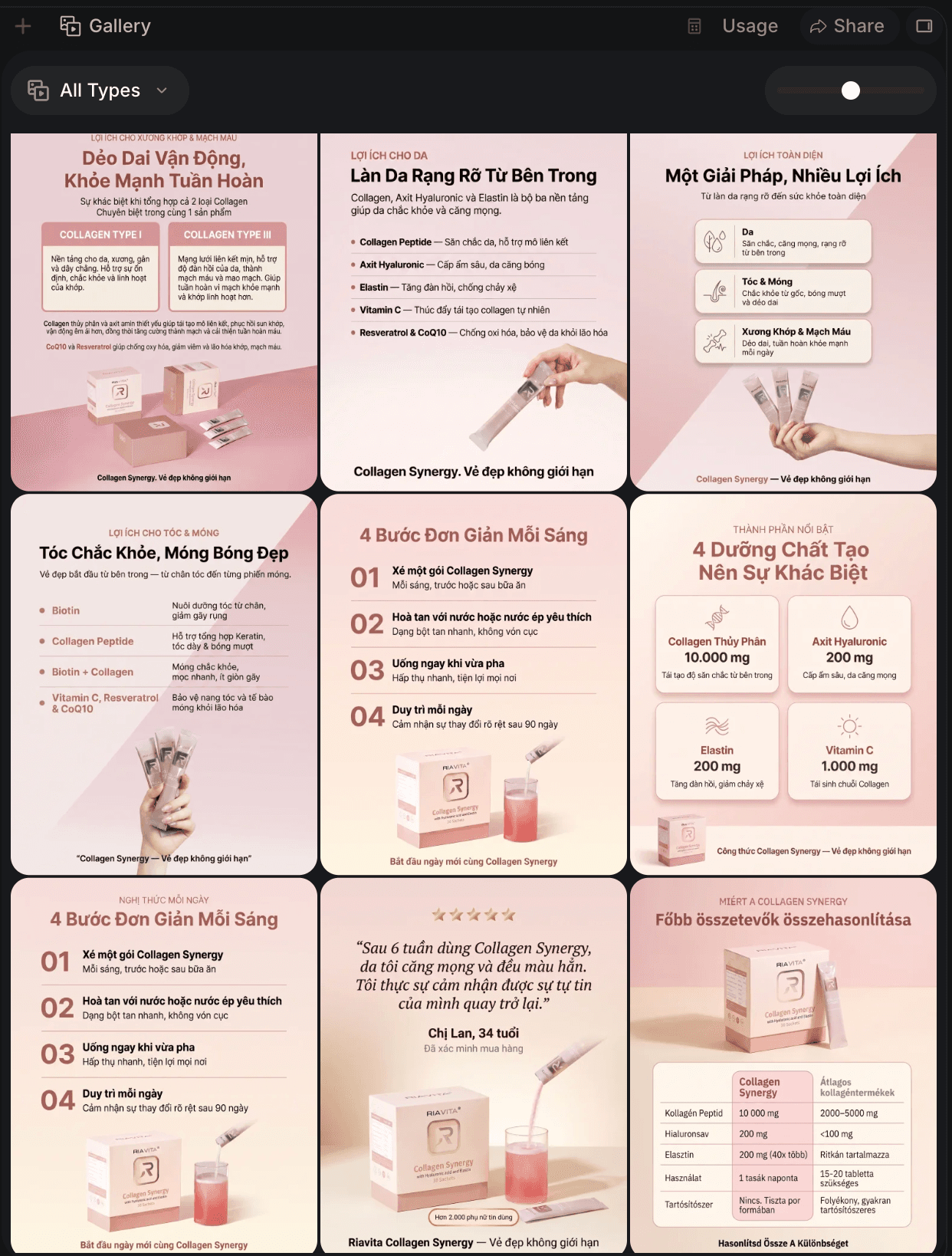
This isn't a Higgsfield-specific quirk. It's the same "brief before build" principle that holds for any generative workflow: separating *thinking* (what the brand is) from *building* (what to generate) catches wrong assumptions while they're still cheap to fix, rather than after you've generated five inconsistent concepts.
FAQ
Do I need a professional photoshoot for this to work?
No. 3-5 phone photos with decent lighting and a plain background are enough. The workflow is built to skip the studio-shoot step entirely.
What if I don't have a brand guideline yet?
That's what Step 2 is for. You don't need one going in. Claude generates it from your product photos and a one-line description, and that becomes the guideline you reuse.
What is Higgsfield Supercomputer?
It's the ad-concept generation tool used in Step 3 of this workflow — it takes your product photos, landing page, and brand guideline as input and returns a written ad concept.
How long does this actually take?
The workflow is designed to run in a single afternoon: photo prep, one Claude prompt for the guideline, one Higgsfield prompt for the concept.
Can I reuse the same brand guideline for multiple ad concepts?
Yes, that's the point of generating it first. One guideline can anchor every ad concept you generate afterward, for different products, seasons, or campaigns, as long as the brand itself hasn't changed.
Try it yourself
Save both prompts above, run them in order, and you'll have a full batch of on-brand ad concepts by the end of one sitting.
Quick Summary
- 1.Batch a month's worth of ad content in one afternoon with a simple three-step workflow:
- 2.(1) prepare 3–5 product photos,
- 3.(2) use an LLM like Claude/GPT/Gemini to generate a brand guideline from those photos,
- 4. (3) feed both the guideline and photos into Higgsfield Supercomputer to generate ad concepts. Creating the brand guideline first is the key—it gives every concept the same visual identity and brand voice, so your ads feel cohesive instead of looking like unrelated AI-generated pieces. Reuse the same guideline across products, campaigns, and seasons to create consistent, on-brand content at scale.
stay updated
Get workflows like this in your inbox
New UGC techniques, AI tools, and creative workflows — straight to your inbox.
next step
Ready to scale this?
I help creators and brands build end-to-end UGC workflows that drive sales. From workflow automation to content strategy, let's create a system that works.
Work with me →