// UGC & Video
UGC Dinner Dress Ad Creation
Create AI models for your fashion brand
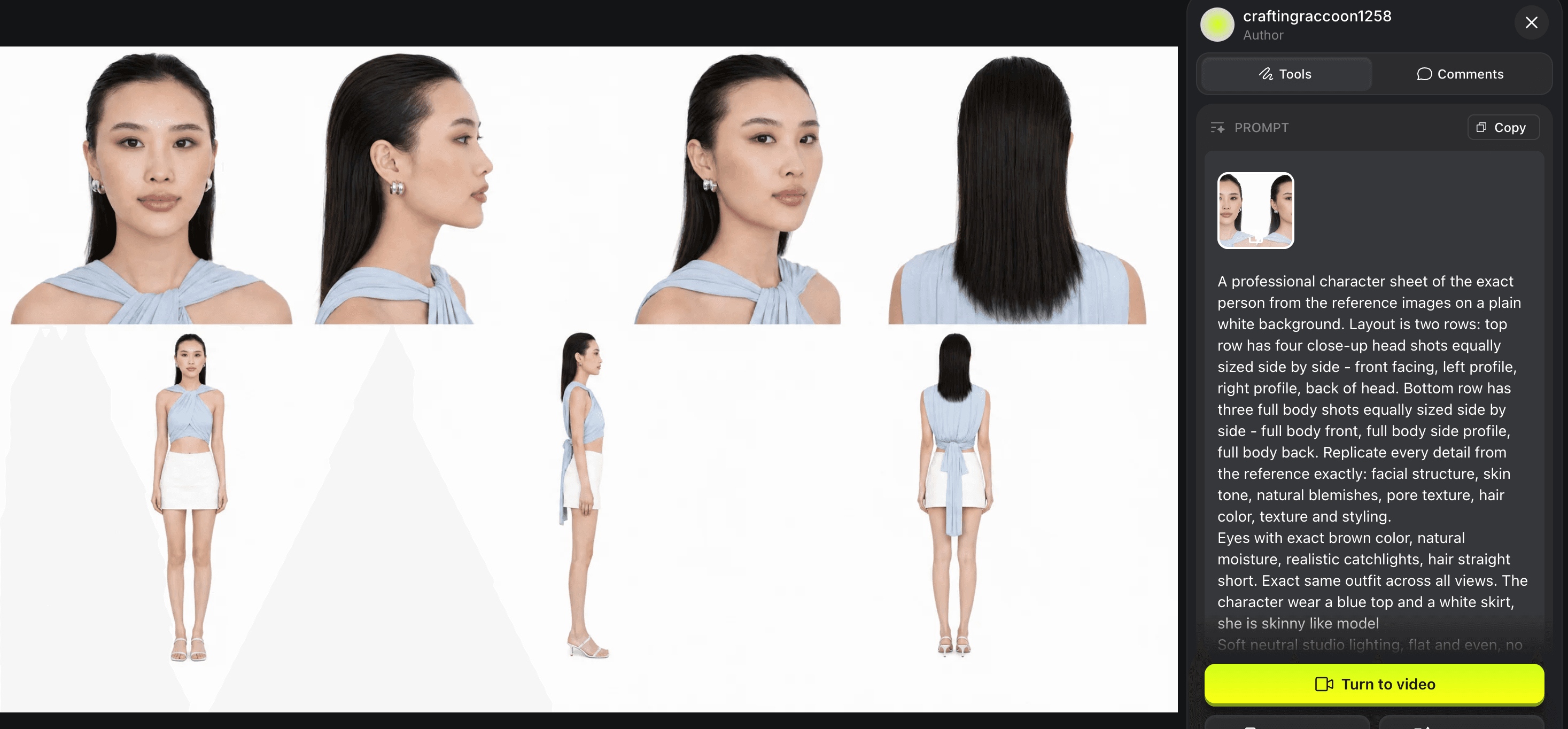
Step 1: Create AI Avatar ①
Open GPT Image 2.0 on Higgsfield to create AI Avatar
Upload one photo of you
[Choose any photo that can clearly show your face features. Best with white background]
Use this prompt
A professional character sheet of the exact person from the reference images on a plain white background. Layout is two rows: top row has four close-up head shots equally sized side by side - front facing, left profile, right profile, back of head. The bottom row has three full body shots equally sized side by side - full body front, full body side profile, full body back. Replicate every detail from the reference exactly: facial structure, skin tone, natural blemishes, pore texture, hair color, texture and styling.

Eyes with exact brown color, natural moisture, realistic catchlights, hair straight short. Exact same outfit across all views. The character wears a blue top and a white skirt.

Soft neutral studio lighting, flat and even, no shadows, no color cast. Every view is perfectly consistent.

Shot on Hasselblad X2D 100C, photorealistic, sharp micro detail, RAW photograph
Step 2: Add your product picture ②
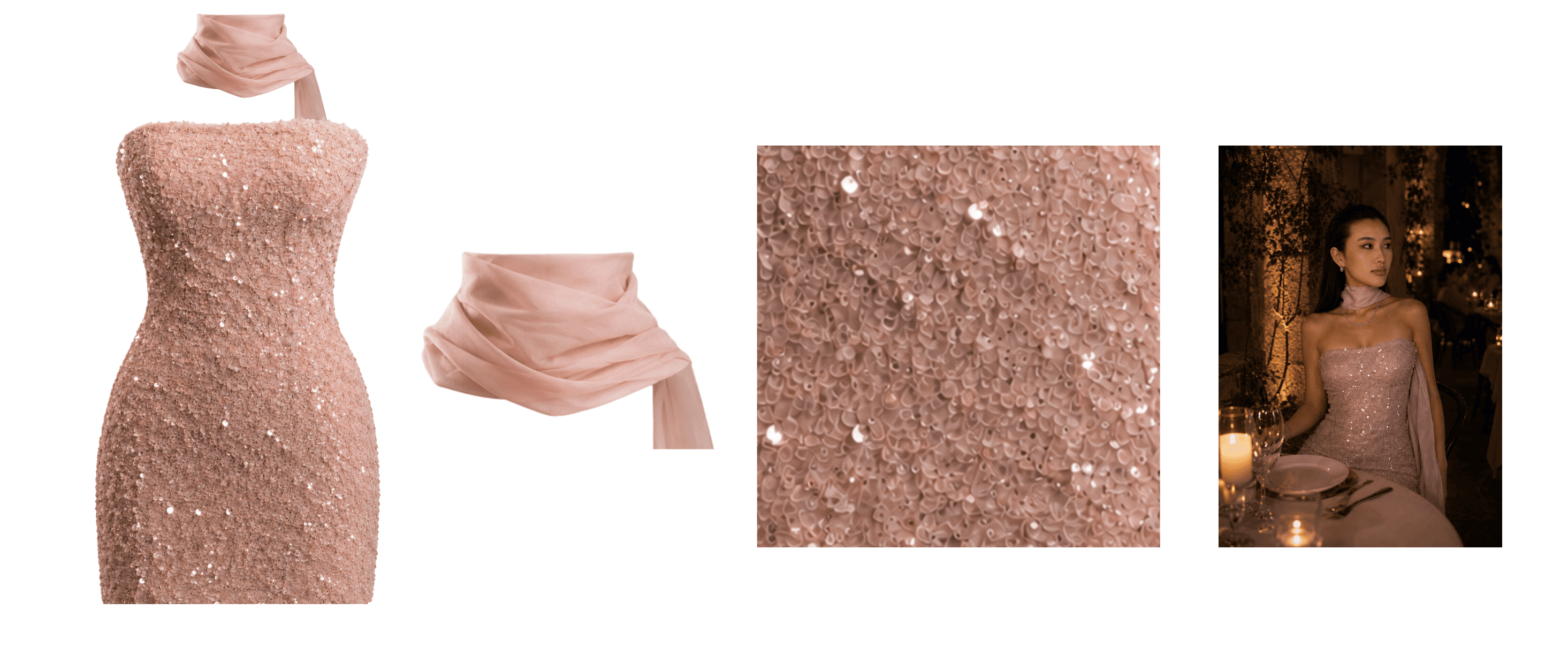
Use your product picture
A white background product picture or a picture with the model in your brand clothing.
Use this prompt to generate new product
A hyper-realistic cinematic portrait of an elegant young woman at an intimate South of France countryside restaurant during dinner at night. She is seated gracefully at a beautifully set table, surrounded by rustic stone walls, climbing vines, flowers, and soft candlelight. The atmosphere is luxurious, romantic, and ethereal, like a hidden French Riviera restaurant.

She wears a delicate pale blush pink strapless sequin mini dress with intricate shimmering texture, paired with a soft flowing silk scarf around her neck. She has small, elegant crystal drop earrings inspired by Swarovski jewelry, a subtle diamond necklace, and minimal refined accessories.

Her pose is natural and candid: she is not looking directly at the camera, but slightly turning her head and gazing softly to the side as if enjoying the moment. Her expression is calm, confident, and sophisticated.

Her long dark hair is sleek but slightly voluminous with natural movement and soft texture. Her face remains highly realistic with natural skin texture, visible pores, subtle facial details, realistic skin imperfections, fine peach fuzz, and matching skin tone between her face and body. Avoid overly smooth beauty retouching.

Lighting should look completely natural, as if she is truly present in the restaurant: warm candlelight illuminating her face from nearby tables, soft shadows, realistic ambient light reflections, gentle highlights on her skin and jewelry. The face should blend naturally with the warm environment, with accurate skin tones and realistic color grading.

Background: upscale Provence / South of France outdoor dining terrace, candlelit tables, wine glasses, linen tablecloths, blurred guests, warm lanterns, stone architecture, bougainvillea flowers, deep evening blue sky, luxurious but intimate atmosphere.

Photography style: luxury fashion editorial photography, cinematic DSLR shot, 85mm lens, shallow depth of field, natural bokeh, realistic depth, ultra-detailed skin texture, photorealistic, high resolution, Vogue-style evening portrait.

Composition:Half-body portrait, seated pose, full upper body visible including dress details, natural framing, subject integrated into the environment, not a studio look.

Negative prompt: Artificial smooth skin, plastic face, over-edited beauty filter, mismatched skin tones, fake lighting, CGI appearance, distorted facial features, oversized jewelry, exaggerated makeup, unnatural pose, looking directly at camera, blurry face, unrealistic body proportions.
Also use GPT Image 2.0 Model
Step 3: Video Prompt ③
Open Google Flow
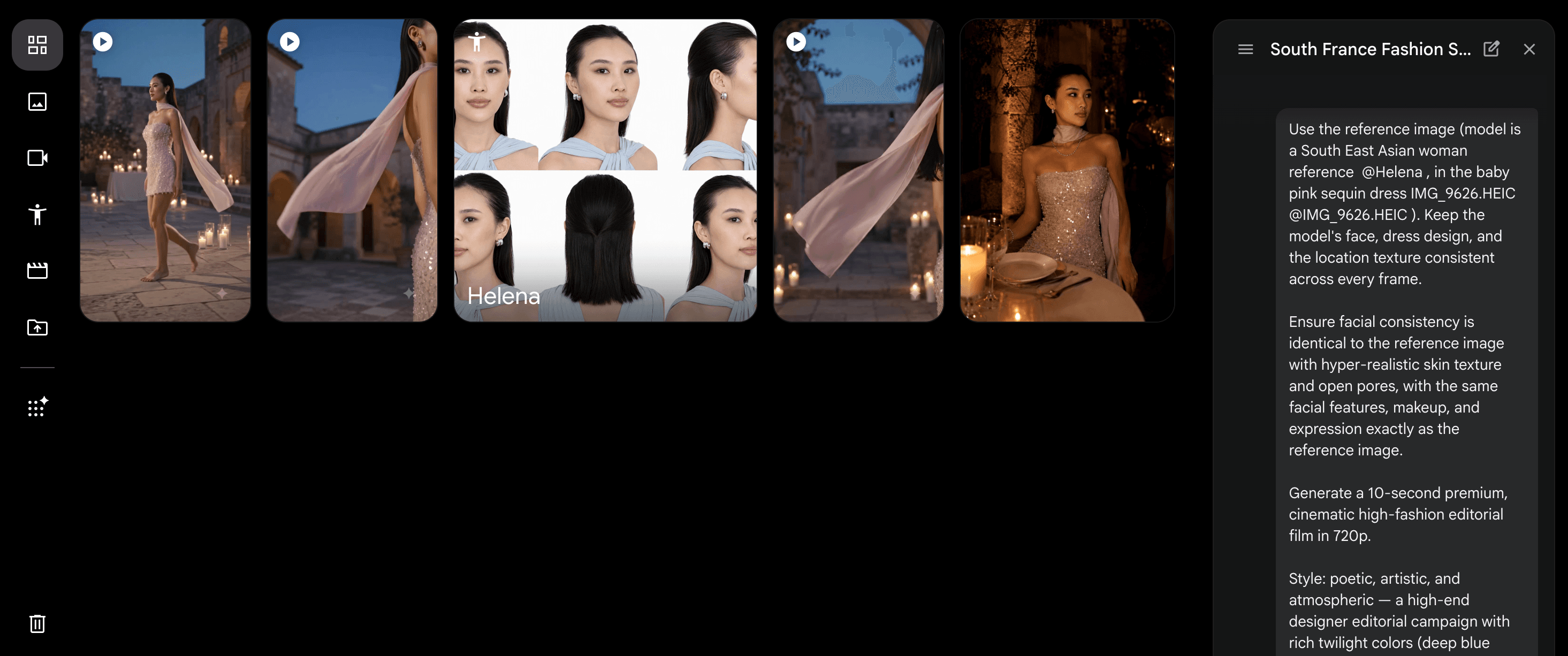
Attach the two images (① + ②) along with this prompt. Length: 10s · Resolution: 720p. Ratio 9:16
Use the reference image (model: South East Asian woman, @your model, wearing the baby pink sequin dress @your product). Keep the model’s face, dress design, styling, and environment texture consistent across every frame.

Ensure facial consistency is identical to the reference image: same facial structure, makeup, brown Asian eyes, expression, and hyper-realistic skin texture with natural pores, fine details, and matching face and body skin tone.

Generate a 10-second premium cinematic high-fashion editorial film in 720p.

Style:

Poetic, feminine, artistic, and atmospheric. A luxury designer campaign aesthetic with deep blue hour tones, warm candlelight, soft lavender shadows, and real 35mm film quality. Natural human realism, not an AI look. Shallow depth of field, 85mm lens, cinematic bokeh, soft lens flare.

Movement:

Very gentle feminine camera movement. No quick cuts. The model never speaks. Only natural movements, elegant gestures, and realistic fabric physics.

Frame 1 — Face Reveal & PresenceLow-angle camera rises to her face with a soft flash, revealing a proud, confident, elegant, and feminine expression with realistic skin texture.

Frame 2 — Couture Dress DetailMacro close-up of the baby pink sequin dress highlighting couture details, crystal reflections, layered texture, and shimmering candlelight tones.

Frame 3 — Silk Scarf MovementThe sheer silk scarf gently flows in the breeze, catching warm candlelight and creating a soft Riviera-inspired atmosphere.

Frame 4 — Graceful Walk Through Candlelit HallFull-body shot of her walking elegantly through a candlelit stone hall as the sequin dress glows against the luxurious surroundings.

Frame 5 — Confidence & Feminine Power PortraitSlow cinematic portrait capturing her confident, powerful, and feminine presence with identical facial identity and natural expression.

Final FrameShe looks slightly away from the camera as the sequins glow, the silk scarf moves gently, and the scene ends with a dreamy luxury fashion editorial feeling.

Editing:

Smooth cinematic transitions, continuous visual flow, realistic human movement, natural lighting integration, realistic fabric physics, and authentic 35mm film studio quality.

No artificial AI appearance. No plastic skin. No exaggerated beauty filter. No unnatural motion.
Step 4: Voice Over
Open Eleven labs for voice over
Choose the voice you find relevant to your brands. Or adding your own voice with Paid version
I used Beth - Bold and Smooth Narator
Step 5: Final Touch
Open CapCut if you want any scene to be adjusted
Quick Summary
- 1.In GPT Image 2.0, generate the model with prompt ①
- 2.In GPT Image 2.0, generate the model in dress with prompt ② (or use an existing product image).
- 3.Open Google Flow, attach images ① + ②, and paste prompt ③ → it generates and stitches the ad automatically.
- 4.Open Eleven Labs for voice over.
- 5.If any of the scene is not as you want, use CapCut to cut it out or replace the position.
stay updated
Get workflows like this in your inbox
New UGC techniques, AI tools, and creative workflows — straight to your inbox.
next step
Ready to scale this?
I help creators and brands build end-to-end UGC workflows that drive sales. From workflow automation to content strategy, let's create a system that works.
Work with me →